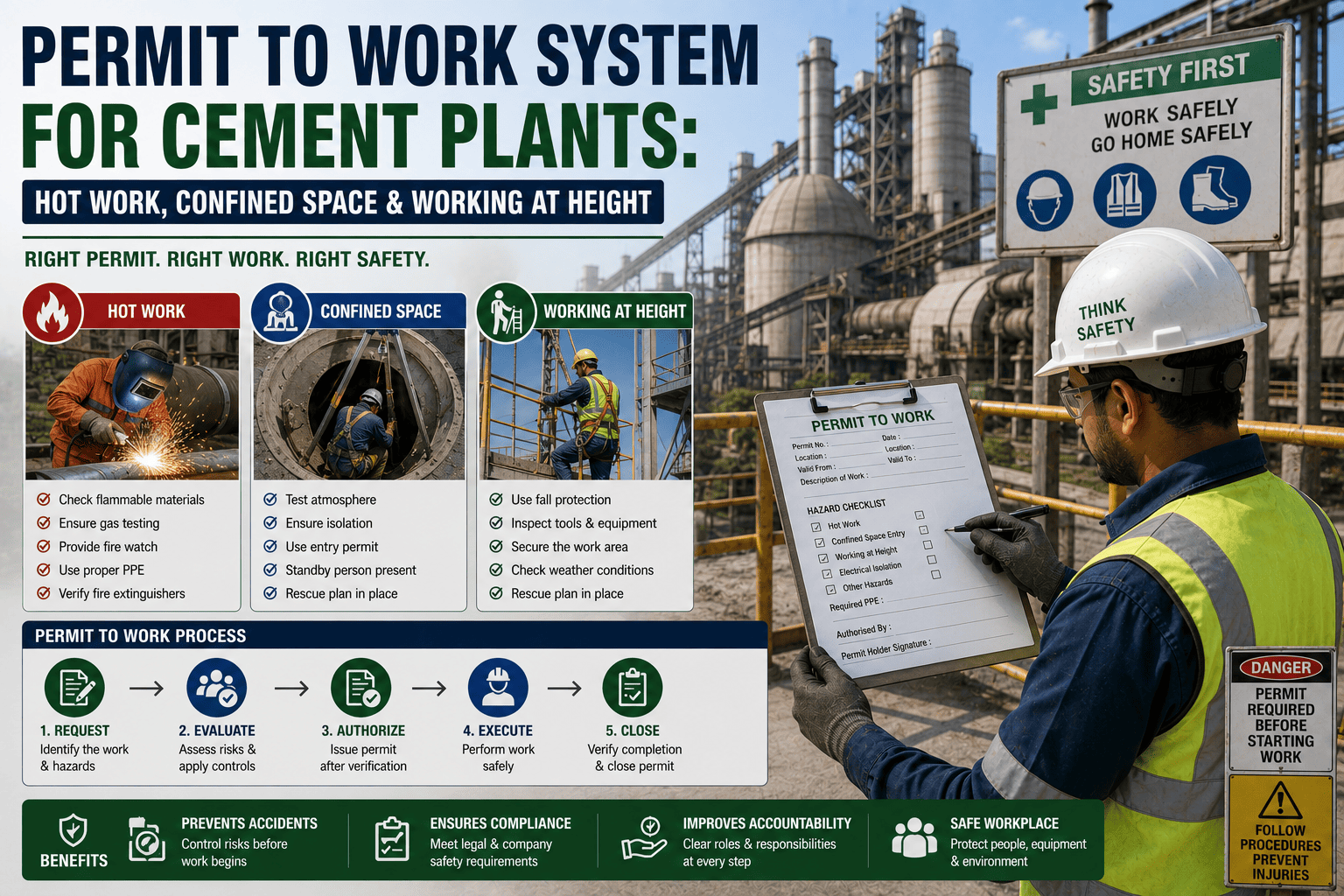
Welding near a conveyor, entering a silo, or working off a platform thirty feet up are three completely different hazards, but all three need the same thing before anyone starts: a permit that says the risk has actually been thought through. Sign up to see how Oxmaint keeps hot work, confined space, and height permits tied directly to the job they're issued for.
3 Types
Core high-risk permit categories every cement plant issues regularly
Before Every Job
When a permit needs to be raised, not just for unusual or one-off tasks
5 Stages
Typical path a permit follows from request to close-out
Named Approver
Every permit needs a specific, accountable person signing it off
Why A Permit Isn't Just Paperwork
A permit to work forces someone to stop and check the things that get skipped when a job feels routine: is there a gas hazard in that silo, is a fire watch actually posted, is the fall arrest anchor point rated for the job. The form is a byproduct, the checking is the point.
The Three Permit Types Every Plant Relies On
| Permit Type |
Covers |
Key Check Before Starting |
| Hot Work |
Welding, cutting, grinding, or any spark-producing activity |
Flammable materials cleared and a fire watch posted for the duration |
| Confined Space |
Silos, ducts, tanks, or any space with limited entry and exit |
Atmosphere tested for oxygen and toxic gas before anyone enters |
| Working At Height |
Any task performed on a platform, ladder, or structure above ground level |
Fall arrest anchor points inspected and rated for the load |
Attach Every Permit To The Actual Work Order
Oxmaint keeps hot work, confined space, and height permits linked to the job they were issued for, with approvals and close-outs recorded automatically. Sign up for a free trial to connect your first permit workflow, or book a demo to see it in action.
How A Permit Moves Through The Plant
1
Request
The technician raises a permit describing the task, location, and equipment involved
2
Risk Assessment
Hazards specific to the task are identified and matched against required controls
3
Approval
A named, authorized approver reviews and signs off before work is allowed to begin
4
Work Monitored
Conditions are periodically re-checked while the job is active, especially for confined space entries
5
Close-Out
The permit is formally closed once the area is confirmed clear and safe to return to normal operation
Paper Permits vs A Digital Permit System
Paper Permits
Permits filled out by hand and easy to backdate or fill in after the fact
Approvals hard to trace back to who actually reviewed the risk
No easy way to see how many permits are open across the plant right now
Digital Permit System
Time-stamped requests and approvals that can't be edited after the fact
Every approver's name and decision recorded against the specific job
A live view of every open permit across the plant at any moment
Where A CMMS Fits Into Permit To Work
Oxmaint attaches hot work, confined space, and height permits directly to the work order they belong to, so approvals, checks, and close-outs are all recorded in one traceable place instead of scattered across paper forms.
Frequently Asked Questions
Q
What's the difference between a hot work permit and a confined space permit?
A hot work permit controls ignition risk from sparks or flame, while a confined space permit controls atmospheric and access risk inside enclosed spaces like silos or tanks, and a job can need both at once.
Q
Who is allowed to approve a permit to work?
Only a named, trained authorizer with the competence to judge that specific hazard should approve a permit, and that person is accountable for confirming the risk assessment and controls before signing off.
Q
Can a CMMS manage permit to work digitally?
Yes, a CMMS can route permit requests for approval, timestamp every decision, and keep the record tied to the work order so it's instantly available if a safety review or audit ever asks for it.
Give Every Permit A Clear, Traceable Path
Oxmaint keeps hot work, confined space, and working at height permits tied to the work order, with every approval and close-out recorded automatically. Sign up for a free trial to connect your first permit workflow, or book a demo to see it in action.